
PausePlay 0.22.0-2 Release Notes: Meliv AI
PausePlay 0.22.0-2 Release Notes: Introducing Multi-Object AI Analysis with Meliv
Release Date: November 2, 2026
Category: Release Notes
Version: 0.22.0-2
PausePlay 0.22.0-2 introduces a major addition to the platform: Meliv, our AI-powered Salesforce automation assistant, now available to eligible PausePlay Pro customers.
This release brings natural-language task analysis, multi-object automation discovery, AI-assisted risk recommendations, and proposed PausePlay configurations into a single guided experience.
The goal is simple: help Salesforce teams understand what their automations might do before making changes, and give them a controlled way to act on those insights.
1. Introducing the PausePlay AI Guided Assistant
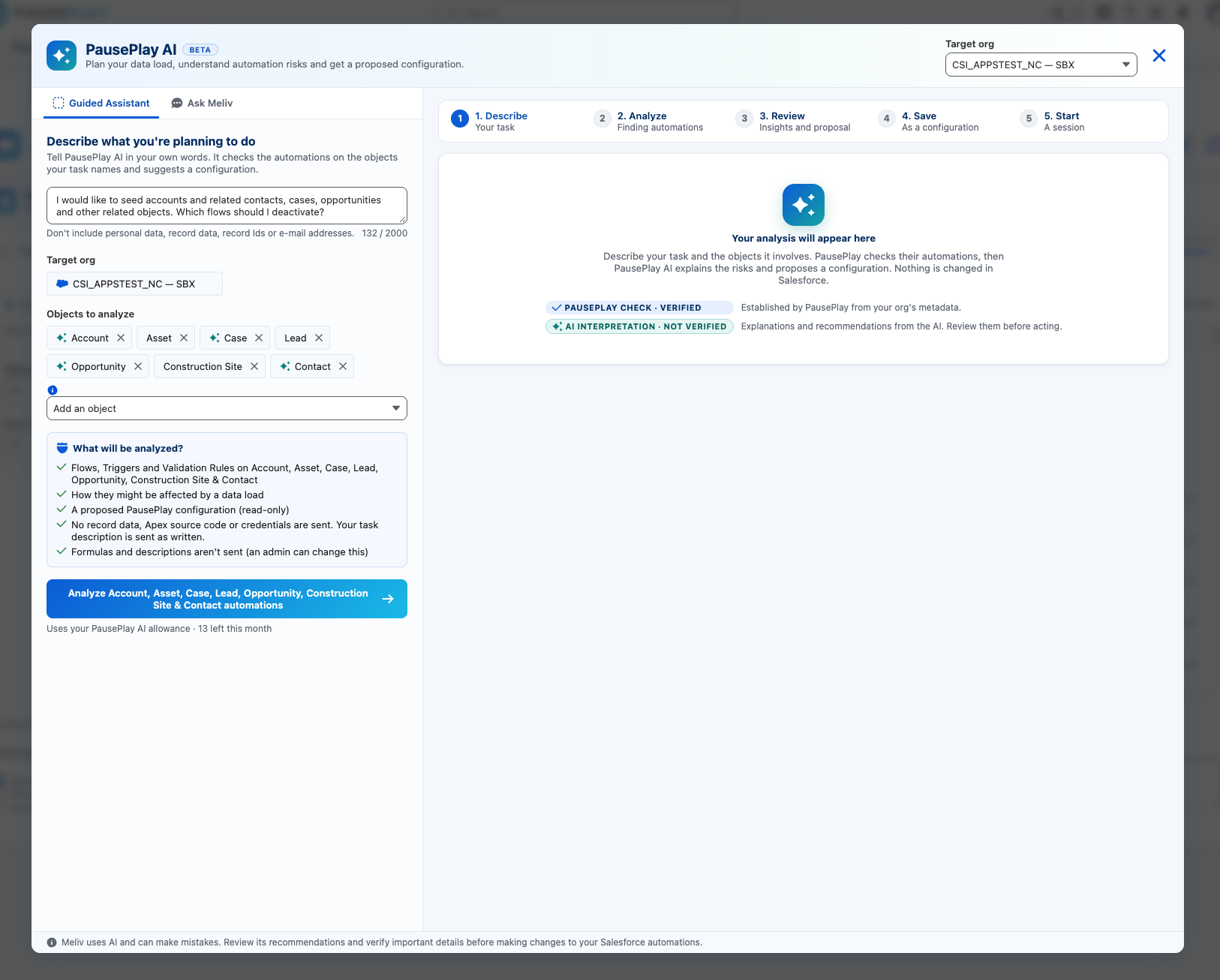
With the new Guided Assistant, users can describe a planned Salesforce operation in everyday language.
For example:
"I would like to seed Accounts and related Contacts, Cases, Opportunities and other related objects. Which Flows should I deactivate?"
PausePlay identifies the Salesforce objects mentioned in the request and presents them as editable selections.
Users can add or remove objects before starting their analysis.
The Guided Assistant follows five steps:
Describe: Explain the task and select the relevant Salesforce objects.
Analyze: Discover automations and generate recommendations.
Review: Inspect findings, risks, and proposed actions.
Save: Create a reusable PausePlay configuration.
Start: Start a session using PausePlay's existing execution controls.
2. Multi-Object Automation Analysis
Previously, AI analysis was focused on individual Salesforce objects.
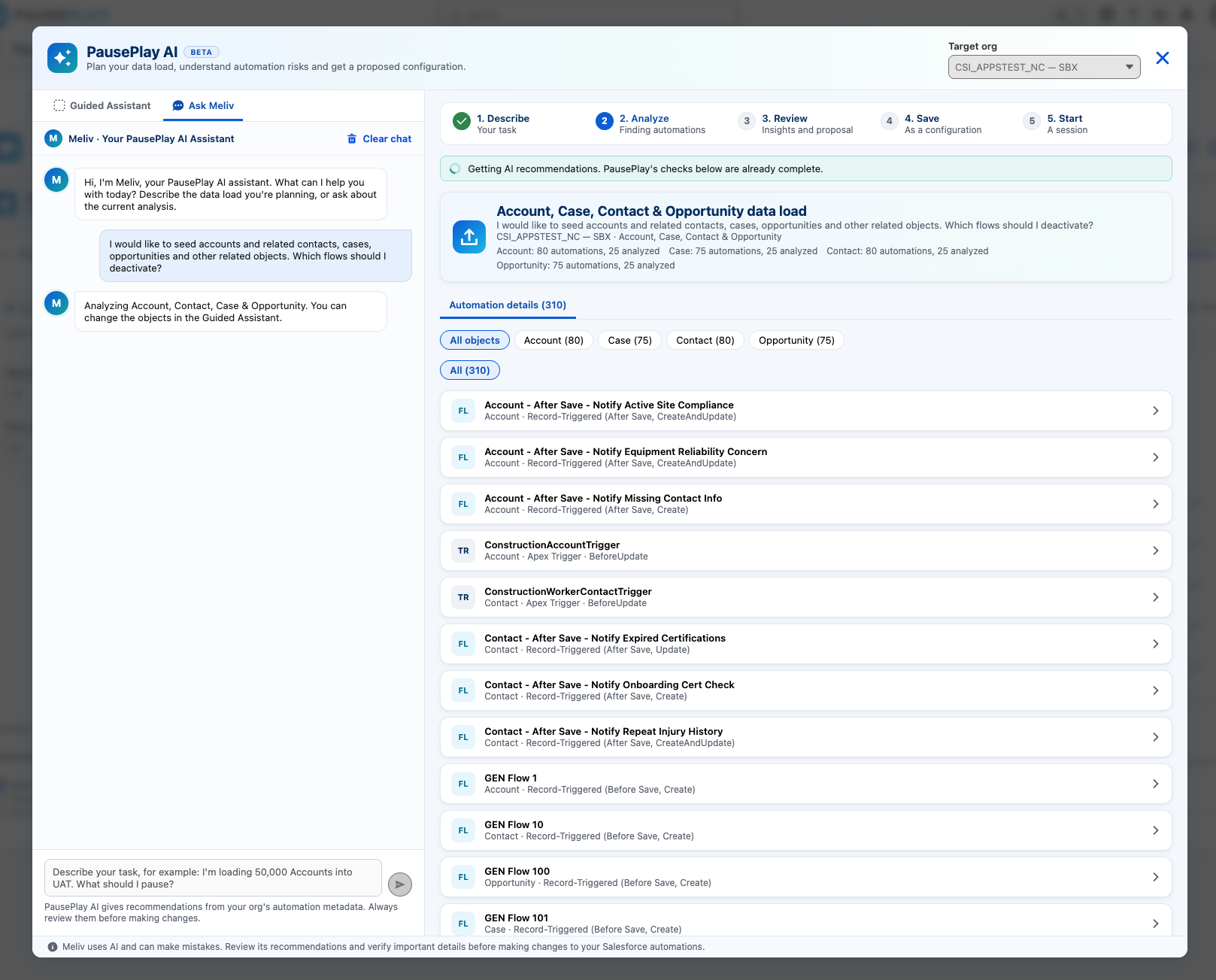
With version 0.22, Meliv can analyze automations across multiple objects in one request.
This is particularly useful for operations involving related records, such as data seeding, data migration, and bulk updates.
The analysis supports:
Salesforce Flows
Apex Triggers
Validation Rules
Standard and custom Salesforce objects
PausePlay discovers relevant automations in the selected target organization and displays the findings by object.
Users can filter the results to inspect individual automations and better understand their role in the planned operation.
Analysis limits: A single AI request analyzes up to 100 automations across a maximum of 25 selected objects. If more automations are discovered, PausePlay identifies the excluded items and explains that the AI analysis is partial.
3. AI-Powered Risk Recommendations
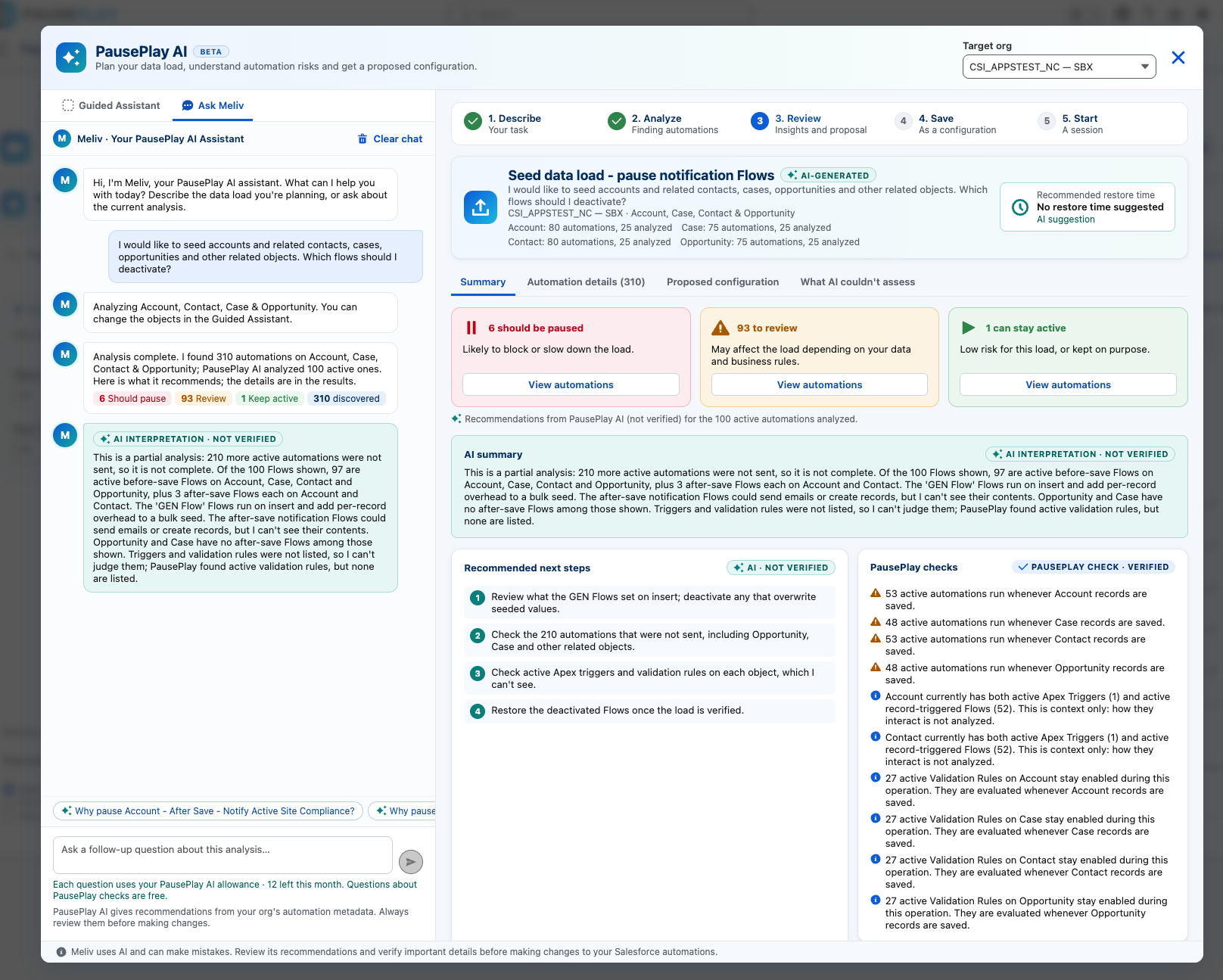
Meliv evaluates the selected automation metadata in the context of the user's task and organizes recommendations into three categories.
Pause
Automations that may interfere with the planned operation, introduce unwanted behavior, or create unnecessary processing overhead.
Review
Automations that require further inspection because their impact depends on business logic, data conditions, or dependencies.
Keep Active
Automations that appear suitable to remain active for the planned operation.
Each analysis provides a summary, recommended next steps, and explanations of the identified risks.
Verified checks versus AI interpretation
A key part of this release is the clear separation between information verified by PausePlay and recommendations generated by AI.
PausePlay Check — Verified identifies findings established through Salesforce metadata and PausePlay's own checks.
AI Interpretation — Not Verified identifies AI-generated explanations and recommendations that users should review before acting.
Meliv's assessment is advisory. It does not independently prove every cross-object dependency or business outcome.
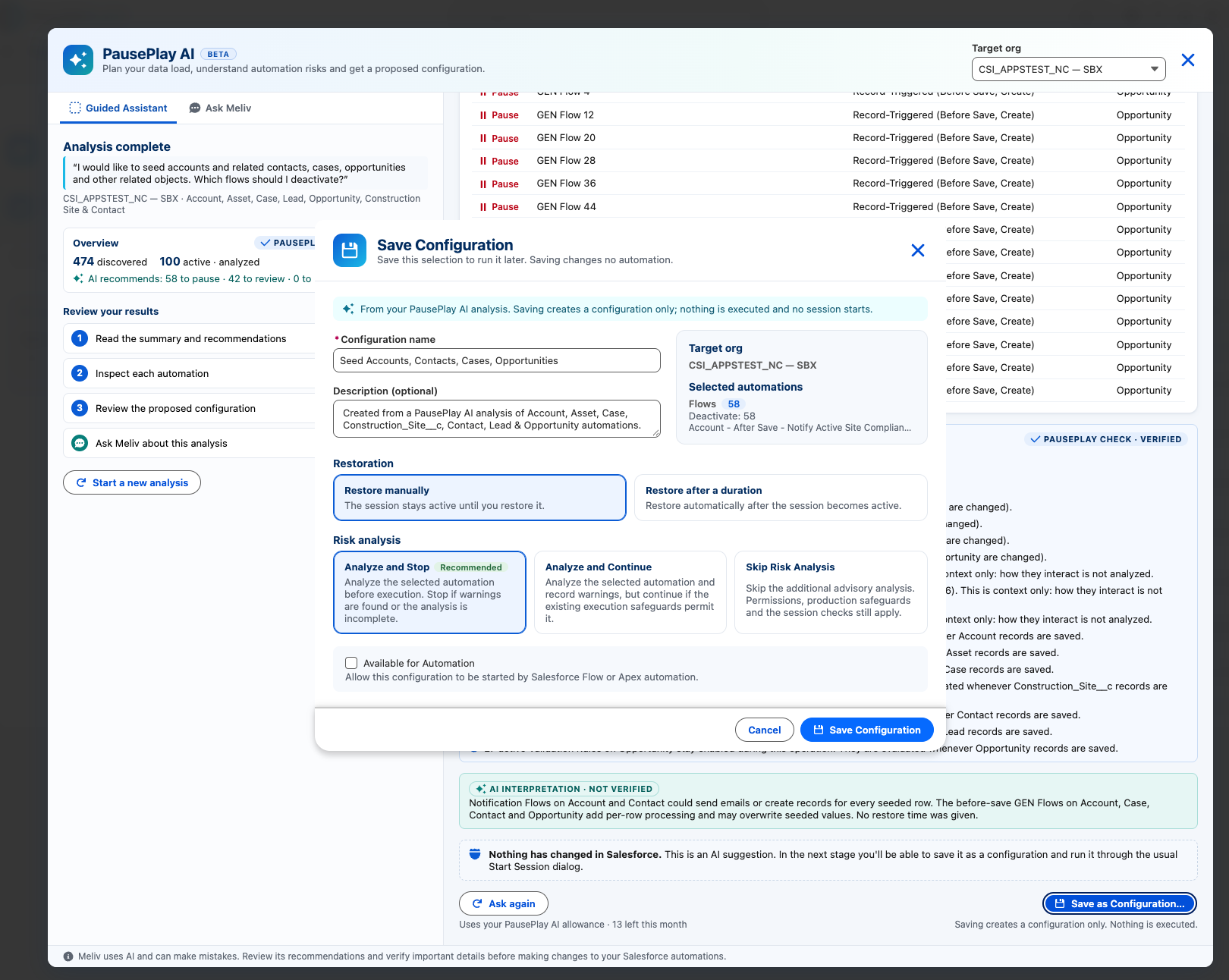
4. Generate and Save PausePlay Configurations
Once an analysis is complete, Meliv can propose a configuration containing the automations selected for pausing.
Users can review the proposal before saving it as a standard PausePlay configuration.
The Save Configuration dialog supports:
Configuration name and description
Selected automations
Target organization
Manual restoration or restoration after a duration
Risk analysis options
Availability for automation-driven execution, where applicable
Saving a configuration does not deactivate any automation or start a session.
Users remain in control of when the configuration is executed.
5. Start a Controlled PausePlay Session
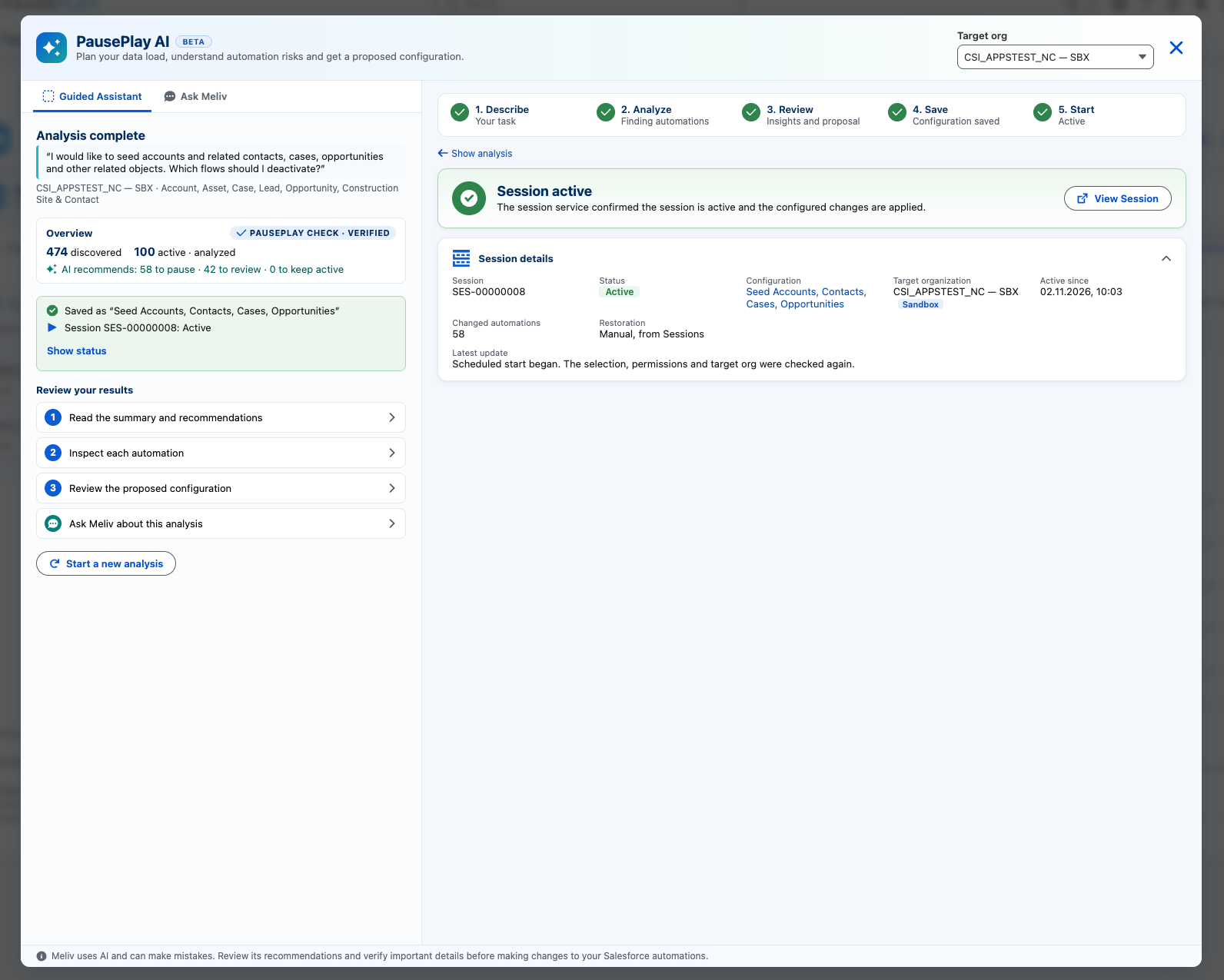
After saving a configuration, users can proceed through PausePlay's existing session controls.
PausePlay verifies the target organization, selected automations, and required permissions before applying the requested changes.
The session interface displays its current status, the configuration used, affected automations, and restoration information.
This keeps AI-assisted preparation separate from the actual execution of automation changes.
6. Conversational Assistance with Ask Meliv
The Ask Meliv interface provides a conversational way to interact with the analysis.
Users can ask questions about the findings, explore why an automation was recommended for pausing, and request additional explanations.
Suggested follow-up questions make it easier to investigate specific automations without starting the entire workflow again.
Follow-up AI questions consume the customer's available AI request allowance.
7. AI Onboarding, Transparency and Safeguards
PausePlay AI requires an authorized administrator to review and acknowledge the AI disclosure before enabling the service.
The disclosure explains how AI processing works and links to the applicable privacy notice and AI terms.
PausePlay AI uses Anthropic's Claude models to process relevant automation metadata and task descriptions. Salesforce business records and Apex source code are not required for this analysis.
Users are advised not to include personal data, record identifiers, or email addresses in their task descriptions.
AI-generated recommendations are advisory and must be reviewed before changing Salesforce automations.
8. Availability and Usage Allowances
PausePlay AI is available to eligible Pro customers running PausePlay version 0.22 or later.
Included with PausePlay Pro:
20 AI requests per month
Multi-object automation analysis
AI-generated risk recommendations
Conversational follow-up questions
Proposed PausePlay configurations
A separate AI add-on with an expanded allowance is planned but is not yet available for purchase.
Eligible Pro customers can connect and use PausePlay AI without requesting manual activation from Saika.
9. Upgrade Requirements
To access Meliv, customers must:
Install or upgrade to PausePlay version 0.22 or later.
Have an eligible, active PausePlay Pro entitlement.
Open PausePlay AI and complete the required acknowledgement.
Connect the AI service and begin an analysis.
Organizations using earlier package versions must upgrade before accessing the new AI functionality.
10. Looking Ahead
This release marks an important step in the evolution of PausePlay.
Our focus is moving beyond simply switching Salesforce automations on and off toward helping teams understand which automations deserve attention, why they matter, and how to manage them safely.
Meliv is an additional layer of intelligence built around the controls PausePlay already provides.
Understand the risk. Review the recommendation. Stay in control.
Learn more: pauseplay.app
AI Privacy Notice: pauseplay.app/privacy/ai
AI Terms: pauseplay.app/terms/ai
Explore more topics
- PausePlay
- Release Notes
- Version 0.22.0
- Meliv
- PausePlay AI
- Salesforce Automation
- Multi-Object Analysis
- Salesforce Flows
- Apex Triggers
- Validation Rules
- Automation Risk Assessment
Explore More
Related Posts
PausePlay 0.18.0 Release Notes: Agentforce Integratio
PausePlay 0.18.0-3 introduces seven Salesforce Agentforce actions for governed automation control, including configuration discovery, change previews, authorized execution, session monitoring, and restoration. Explore the new capabilities, security safeguards, and upgrade information.
PausePlay 0.17.0 Release Notes: Custom Switches and Cross-Org Management
PausePlay 0.17.0 introduces Custom Switches, scoped automation controls, Apex and Flow integration, timed restoration, configuration import/export, and Pro cross-org management.
Meet Meliv: AI-Powered Salesforce Automation Analysis
Meet Meliv, the new PausePlay AI assistant. Analyze Salesforce Flows, Triggers and Validation Rules, understand risks and create automation configurations.